Setting up a new branch is a full-time job in itself. The circuit, the devices, the prefixes, the tenant: all of it goes into NetBox, because that’s where the truth lives.
Then someone opens ThousandEyes and types it in again. Pick the agents, set the interval, paste the URL and attach an alert rule. If you enter the same facts into a second system, you’ve got another go at getting them wrong. This is also the part of onboarding that gets skipped when the person who knows how to do it is on holiday and you only find out about it months later during an incident, when you go looking for a test nobody ever created.
NetBox already describes the site well enough to generate the monitoring from it.
Policy belongs in config contexts
ThousandEyes doesn’t have an object in NetBox, so the temptation is to add one: a monitor_me custom field, a URL field, an interval field, checkbox by checkbox across a thousand devices. That moves the second onboarding into NetBox instead of removing it.
Config contexts are a better fit, since they already work as an inheritance engine. You can assign them by region, site, tenant, role or platform, and NetBox hands you one merged JSON blob per object:
{
  "monitoring": {
    "tier": "branch",
    "interval": 300,
    "agent_count": 2,
    "http_targets": ["https://intranet.example.com"]
  }
}
No one fills that in on each site, and that’s where the onboarding win comes from. Just write it once against the EMEA branch region and once against the data centre region with interval: 60 and agent_count: 4, and a new site gets its own monitoring policy as soon as it has a region and a role.
Config contexts are rendered onto devices and VMs, not sites, and there is no site.config_context. Just make sure you anchor the policy to something real, like the branch edge router, and then deduplicate per site in the renderer.
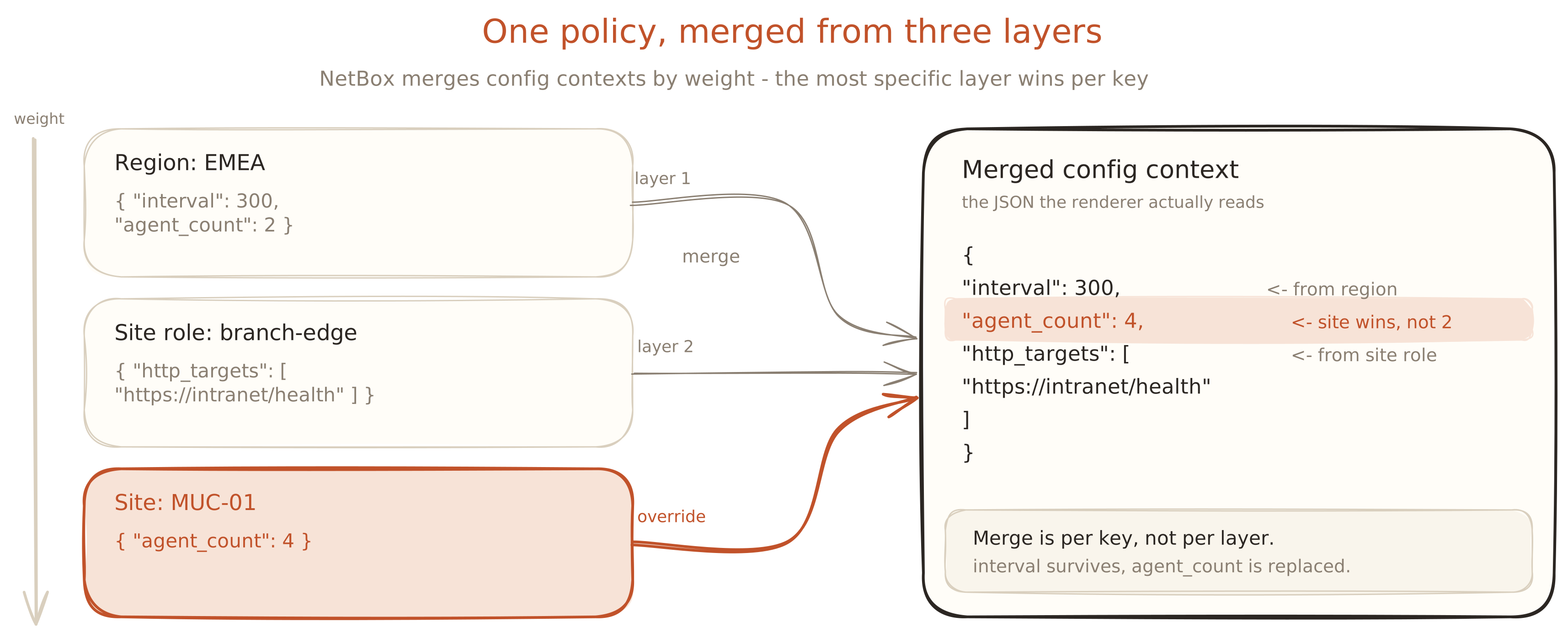
Provisioning is a loop over inherited policy
The ThousandEyes Python SDK is split per product, so a reconciler imports a few packages: core for the client, tests for the test types, tags for identity.
import os
import pynetbox
import thousandeyes_sdk.core
import thousandeyes_sdk.tests

nb = pynetbox.api(NETBOX_URL, token=os.environ["NETBOX_TOKEN"])
config = thousandeyes_sdk.core.Configuration(access_token=os.environ["TE_TOKEN"])

def desired():
    """One entry per site, keyed so it round-trips through a tag value."""
    seen = set()
    for dev in nb.dcim.devices.filter(role="branch-edge", status="active"):
        mon = dev.config_context.get("monitoring")
        if not mon or dev.site.slug in seen:
            continue
        seen.add(dev.site.slug)
        for url in mon["http_targets"]:
            yield f"{dev.site.slug}:{url}", {
                "url": url,
                "interval": mon["interval"],
                "agents": agents_for_region(dev.site.region, mon["agent_count"]),
            }

with thousandeyes_sdk.core.ApiClient(config) as client:
    tests_api = thousandeyes_sdk.tests.HTTPServerTestsApi(client)

    for key, spec in desired():
        tests_api.create_http_server_test(
            thousandeyes_sdk.tests.HttpServerTestRequest(
                test_name=f"netbox/{key}",
                url=spec["url"],
                interval=spec["interval"],
                agents=spec["agents"],
                alert_rules=[BRANCH_HTTP_RULE_ID],
            )
        )
NetBox already knows which agents to use, since a site belongs to a region and a region has agents, so agents_for_region() is a simple lookup.
interval is a TestInterval enum and not a free integer. So if a config context carries interval: 240, it will fail when the test is created, not when the merge request is reviewed. Just validate it in the renderer. When you create a rule, alert_rules takes the ID of that rule, so tests can be generated with the alerting already attached.
ThousandEyes bills units based on the test type, interval and agent count, so the budget line for every site you onboard is interval × agent_count. A rule that creates one test per device will show up on the invoice.
Then the problems start
Creating tests is the easy 80%. The second run is harder, because now you have to work out which tests you’ve already made.
ThousandEyes assigns test IDs and you don’t get to choose them. You can put your key in the test name, and that’ll work until someone renames a test in the UI and you create a duplicate. Tags are a better home, since v7 tags are key/value, but the retrieval path runs backwards from what you’d expect. get_http_server_tests() only takes an aid, and there is no expand on the list call, so tests don’t come back with their tags. Try the opposite and expand assignments from the Tags API. This gives you the whole managed set in one request.
tags_api = thousandeyes_sdk.tags.TagsApi(client)

have = {
    tag.value: assignment.id
    for tag in tags_api.get_tags(expand=["assignments"]).tags
    if tag.key == "netbox"
    for assignment in (tag.assignments or [])
}

want = dict(desired())
create = want.keys() - have.keys()
delete = have.keys() - want.keys()
Only static tags return assignments. A dynamic tag hands back nothing and breaks identity without telling you.
The delete path is the dangerous one
At some point, a site closes and the reconizer has to remove things. It’s more likely that a bad filter will cause problems than a bad diff. This can happen if someone renames the branch-edge role, desired() comes back empty, every managed test lands in delete, and one CI run takes out your synthetic monitoring estate. The pipeline stays green the whole way through because deleted tests don’t alert either.
Three guards, all basic:
- The reconciler can only get rid of tests with a
netboxtag. If someone has made a test by hand in the UI, you can’t touch it. - Don’t delete more than a few tests in one go without using the
--i-mean-itflag. Real change is incremental, so mass deletion means a broken query. - Dry run by default: print the three sets and exit unless you are told otherwise.
That’s a lot of scaffolding, and the official Terraform provider gives you most of it for free. The ThousandEyes engineering team maintain it, it targets API v7, and it covers every test type plus alert_rule, tag, tag_assignment, dashboard and an agent data source. Its state file solves the identity problem and plan is the dry run you would otherwise write yourself. If the mapping logic gets complicated enough, it’s worth writing your own reconciler. HCL being tedious is not a good enough reason.
The great thing about this is that onboarding stays one job. A site is described once by the team who were going to describe it anyway, and the monitoring follows from that description instead of from someone remembering to go and create it.